

Welcome to iMap-Diagrams
iMap-Diagrams is a powerful, intuitive solution designed to transform how you create event space layouts and diagrams. Whether you’re a seasoned professional or just beginning, iMap-Diagrams simplifies planning, layout design, and space organization.
With a simple and user-friendly interface, iMap-Diagrams enables you to generate precise, professional room setups in minutes—without the need for expensive or complicated software. Unlock the power of quick, customizable, and cost-effective designs with iMap-Diagrams today!
Quick and Accurate Diagramming
Auto_Filling:
Y
X
With iMap-Diagrams, create detailed room layouts in seconds. Easily upload your space and use the unique Autofill function to instantly populate it by defining rows, columns, or seating capacity, or by selecting an area to fill automatically. Items are placed with geometric precision, accounting for the spacing requirements of each item—eliminating manual setup and enabling the fast creation of clean, consistant, professional layouts, everytime, no matter the complexity of the layouts.


Auto-Numbering

To speed up your design process even further, you can choose to automatically number groups of items in sequence —such as booths or rounds —with a single click. By removing the need for manual numbering of items, it eliminates errors and ensures your diagrams are always accurate, consistent, and presentation-ready.

Flexible Labeling

With the iMap-Diagrams Labeling Tool, easily place any text directly on your diagram. Adjust the position, size and rotation of the label as needed to fit your design. This gives you full control over your annotations, ensuring that your labels are clear, perfectly positioned, and aligned with your design.

Fine-Tuning
For added precision, iMap-Diagrams includes tools like a grid and measuring sticks to help you fine-tune spacing and verify key dimensions, such as aisle widths. This allows you to ensure that all elements are correctly spaced and comply with safety or design requirements—improving the consistency and reliability of your diagrams.

Full Set of Design Tools
iMap-Diagrams provides easy room pan and zoom capabilities, and design tools for individual items or groups of items, such as copy, paste, rotate, move, and delete functions. These tools give you complete control over the layout, enabling you to make changes accurately, and quickly with just a few clicks or key strokes.


Print or Export

Once your layout is complete, iMap-Diagrams enables you to print and export your diagram in your preferred file format. You can choose to include various elements in the output, such as your logo, design title, design specifications and item list, —whether you're sharing the diagram with clients or using it internally with staff.

Save and Share

Save your iMap-Diagrams projects to your local hard drive or a shared drive for easy access and future editing. This also allows you to seamlessly share and collaborate projects with others, making teamwork more efficient and ensuring everyone stays on the same page.
Import Once — Design Forever
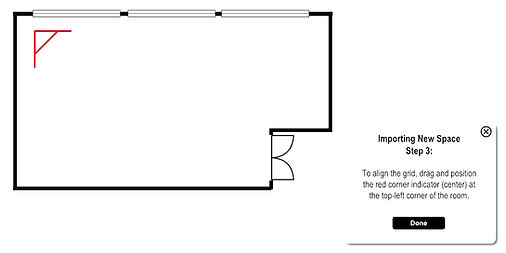
A standout feature of iMap-Diagrams is the ability to design any number of diagrams for an unlimited number of rooms. This is made possible by allowing you to use any of your existing room drawings or images. Follow a simple, 20 second, 4 step guided process to import any size room or space. Once imported, there's no need to import it ever again.
Architectural Drafting & Digital Conversion
If you don't have a pre-existing room drawing or if a drawing is out of date, take advantage of iMap-Diagrams' specialized drafting and digitization service. Whether it's from an image, original architectural plans, or any other format, the iMap-Diagrams team will carefully recreate your space into a precise, clean, and accurate digital asset. We upload the completed room drawing directly into iMap-Diagrams, enabling you to start designing and presenting your space right away.
One License — Unlimited Possibilities
At a fraction of the cost of traditional diagramming tools, iMap-Diagrams gives you access to unlimited diagram creation for any room in your venue, all under a single license. This cost-effective solution allows you to scale your design efforts without worrying about additional fees.
Unlimited
Rooms
Diagrams
195
$
/month
-
Licenses issued annually,
-
Per Designer,
- Includes logo integration for print & export,
-
Comes with 10 custom-designed items, scaled to real-world measurements
Contact Us:
800-881-4627